OCI Card Photo Size and Requirements
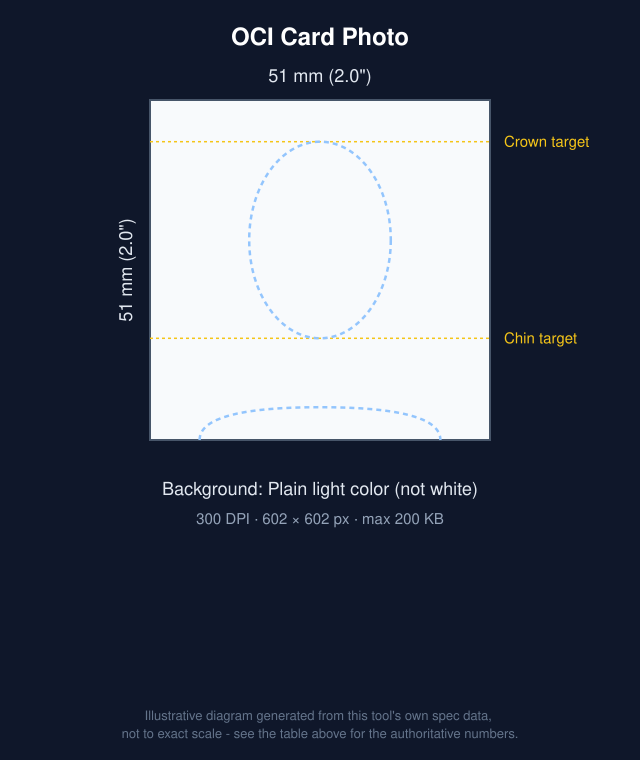
An OCI (Overseas Citizen of India) card photo must be square - width and height equal - not less than 51x51mm, on a plain light-colored background that is explicitly not white, with no border. For the online application's digital upload, the official FAQ specifies 200-900 pixels (width and height equal) as JPEG/JPG, under 200KB.
This tool crops your photo to exactly 51x51mm at 300 DPI - 602x602 pixels, comfortably inside the official 200-900px digital range - and compresses it under the 200KB ceiling. This is a digital-upload-only document, so the print-sheet export isn't offered for it.
| Photo size | 51 × 51 mm (2.0" × 2.0") |
|---|---|
| Resolution | 300 DPI (602 × 602 px) |
| Max file size | 200 KB |
| Format | JPG |
 Make this photo now →
Can you use AI background removal for this photo?
We have not found a published rule specifically banning background removal or other AI editing for this document as of this writing - but policies are changing across the industry, and getting it wrong can mean a rejected application. Always check the official source below for the current rule before using background removal, and when in doubt, use only cropping and resizing.
General photo rules
These apply broadly, but always confirm the specifics for this document on the official source below.
- Neutral facial expression, mouth closed, both eyes open
- Face the camera directly, with no head tilt
- No hats or head coverings, except for religious or medical reasons - your full face must still be visible
- A recent photo, typically taken within the last 6 months
- A plain, evenly lit background with no shadows, patterns, or other people or objects
- Glasses are discouraged or restricted by a growing number of countries due to glare - check the official source below for this document specifically
How to take this photo at home
- Stand about 3-6 feet in front of a plain, light-colored wall with no shadow falling behind you.
- Use even, natural light facing you - a window works well. Avoid harsh overhead light, backlighting, or a direct flash, which all cast shadows.
- Hold the camera at eye level, at arm’s length or propped on a stand, and look straight into it.
- Keep a neutral expression, mouth closed, both eyes open, and remove hats or sunglasses.
- Take a few shots, then upload the sharpest one here - cropping to the exact size, and background removal if you use it, are handled automatically.
Many governments accept a digital photo upload for online applications as well as a printed photo for in-person or mail applications - check the official source below for which your application needs. This tool exports both a single photo file and a 4x6 print sheet, so either way you're covered.
Get it printed nearby
We may earn a commission if you buy prints through the links below, at no extra cost to you. It doesn't change our recommendations or requirement data.
Frequently asked questions
What size is an OCI card photo?
Square, not less than 51x51mm physically; for the online application's digital upload, 200-900 pixels (equal width and height), per OCI Services' official FAQ.
What background color is required?
A plain, light-colored background - the official FAQ explicitly says "not white," without naming a specific alternative color. A light grey or pastel tone is a safe interpretation.
Is there a file size limit?
Yes - 200KB maximum, in JPEG/JPG format, per the official FAQ. That's stricter than most other documents this tool supports.
How tall should my face be in the photo?
The official FAQ says "80% coverage of face" without a precise chin-to-crown millimeter figure; several third-party guides cite 25-33mm, which is more consistent with how a 51x51mm frame is typically proportioned (matching this tool's US template, the same physical size). This tool's alignment guide follows that more specific figure - treat it as a close approximation and check your result against the official page.
Can I get this photo printed for a physical application?
The specification we sourced is for the online application's digital upload. This tool doesn't offer a print-sheet export for this document since the online process is digital-only - check current OCI application instructions if a physical photo is separately required in your case.
Can I smile in the photo?
No - a neutral expression with mouth closed is expected, consistent with the biometric-style photo rules most Indian government documents share.
Source: OCI Services (Government of India) - Official FAQ. Requirements change over time - always confirm the current specification before submitting.