US Passport & Visa Photo Size and Requirements
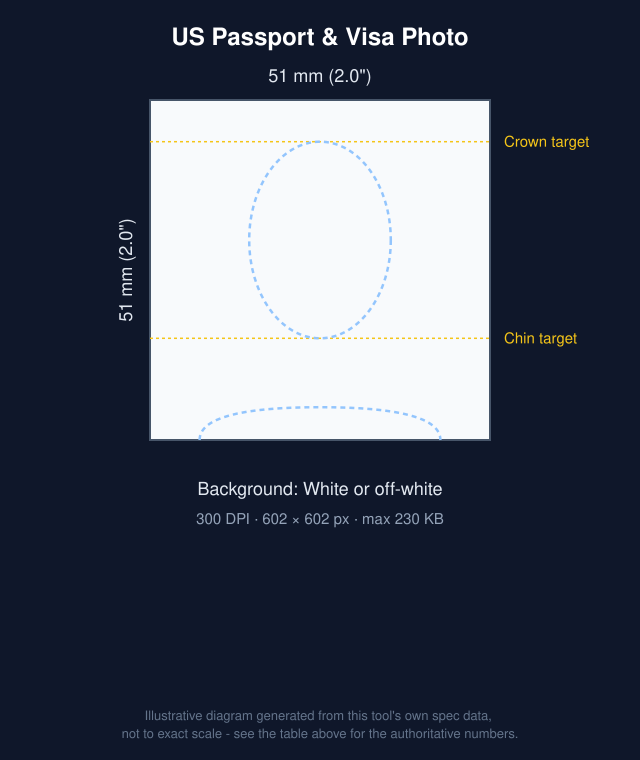
A US (American) passport photo is 2 x 2 inches (51 x 51 mm, 600 x 600 px at 300 DPI), with your head 1 to 1 3/8 inches (25-35 mm) from chin to top of head.
A US passport or visa photo must be exactly 2x2 inches (51x51mm), with the head sized and centered to specific proportions, printed on plain white or off-white background.
This tool crops and resizes your photo to the exact 2x2 inch, 300 DPI size in your browser, for free. The State Department doesn't accept edited photos, so for a US passport or visa the tool stays in Compliance Mode - crop and resize only, with no background changes.
| Photo size | 51 × 51 mm (2.0" × 2.0") |
|---|---|
| Resolution | 300 DPI (602 × 602 px) |
| Max file size | 230 KB |
| Format | JPG |
 Make this photo now →
Can you use AI background removal for this photo?
As of 2026, U.S. State Department guidance says not to alter your photo using computer software, phone apps, filters, or artificial intelligence - including replacing the background - and that submitted photos are checked for signs of this. Cropping, resizing, and correcting DPI are format changes and are fine; changing the background or retouching your appearance is not. This tool defaults to Compliance Mode for this document - crop and resize only, no background changes. If you're applying for a US passport or visa, we recommend staying in Compliance Mode and retaking your photo against a plain white or off-white wall instead of switching to Edit Mode.
US passport/visa photo rules
From the official sources listed at the bottom of this page.
- Taken in the last 6 months
- Printed at 2 x 2 inches (51 x 51 mm)
- Your head is 1 to 1 3/8 inches (25-35 mm) from the bottom of your chin to the top of your head
- A plain white or off-white background, with no shadows, texture, objects or lines
- You can smile, as long as your mouth is closed and your eyes are open - avoid exaggerated expressions
- No glasses - take off eyeglasses, sunglasses and tinted glasses (a signed doctor's note is needed if you can't remove them for medical reasons)
- No edits with computer software, phone apps or filters - the State Department checks photos for digital changes
- Printed on matte or glossy photo-quality paper, with no visible printer dots
How to take this photo at home
- Stand about 3-6 feet in front of a plain, light-colored wall with no shadow falling behind you.
- Use even, natural light facing you - a window works well. Avoid harsh overhead light, backlighting, or a direct flash, which all cast shadows.
- Hold the camera at eye level, at arm’s length or propped on a stand, and look straight into it.
- Keep a neutral expression, mouth closed, both eyes open, and remove hats or sunglasses.
- Take a few shots, then upload the sharpest one here - cropping to the exact size, and background removal if you use it, are handled automatically.
Many governments accept a digital photo upload for online applications as well as a printed photo for in-person or mail applications - check the official source below for which your application needs. This tool exports both a single photo file and a 4x6 print sheet, so either way you're covered.
Get it printed nearby
We may earn a commission if you buy prints through the links below, at no extra cost to you. It doesn't change our recommendations or requirement data.
Frequently asked questions
What size does a US passport photo need to be?
2 x 2 inches (51 x 51 mm), with your head between 1 inch and 1 3/8 inches from chin to top of head, per the U.S. Department of State's photo requirements.
What background color is required?
A plain white or off-white background, with no shadows, patterns, or objects behind you.
Can I wear glasses in a US passport photo?
No. The State Department says to take off eyeglasses, sunglasses and tinted glasses, and not to rest them on your head. If you can't remove your glasses for medical reasons, include a signed note from your doctor with your application.
Can I smile in a US passport photo?
Yes. The State Department says you can smile, as long as your mouth is closed and your eyes are open. Avoid exaggerated facial expressions.
How recent does the photo need to be?
It should be taken within the last 6 months and reflect your current appearance.
Can I take the photo myself and print it at home?
Yes - the State Department accepts photos printed on photo-quality paper at the correct size, or submitted electronically for online renewals where eligible. This tool exports both a single 2x2 photo and a 4x6 print layout with multiple copies.
Source: U.S. Department of State. Requirements change over time - always confirm the current specification before submitting.