UK Passport Photo Size and Requirements
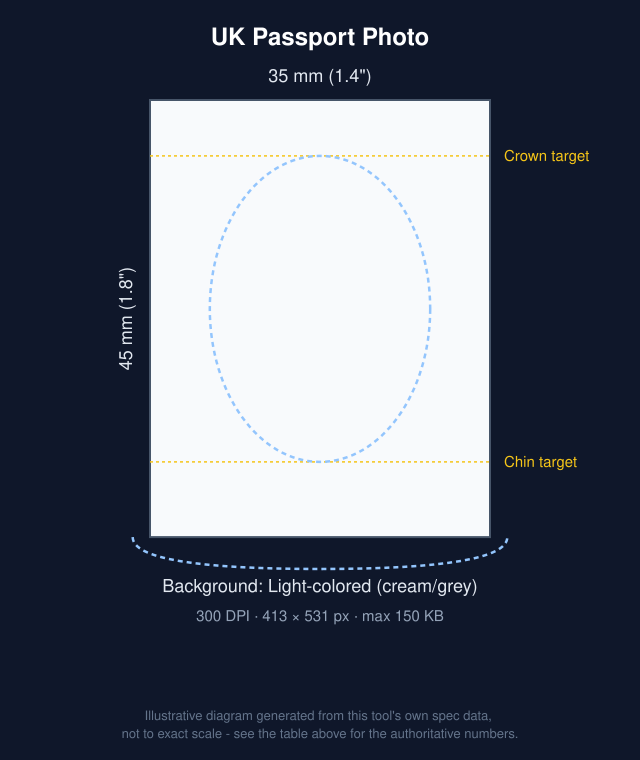
A UK (British) passport photo is 45mm high by 35mm wide (4.5 x 3.5 cm, about 1.8 x 1.4 in), with your head 29-34mm from chin to crown. For an online application, the digital photo must be at least 600 x 750 pixels.
A UK passport photo must measure 35x45mm, showing a full front-facing view of your face against a plain, light-colored (usually cream or light grey) background.
This tool sizes your photo to 35x45mm and exports it at 630x810 pixels, above GOV.UK's 600x750 pixel minimum for digital photos. GOV.UK requires photos to be unaltered by computer software, so take your photo against a plain cream or light grey wall rather than replacing the background.
| Photo size | 35 × 45 mm (1.4" × 1.8") |
|---|---|
| Resolution | 457.2 DPI (630 × 810 px) |
| Max file size | 500 KB |
| Format | JPG |
 Make this photo now →
Can you use AI background removal for this photo?
GOV.UK's official rules say both printed and digital UK passport photos must be "unaltered by computer software". Replacing or removing the background counts as altering the photo. GOV.UK is also strict about framing: a printed photo must not be a cut-down version of a larger picture, and if you take a digital photo on your own device during an online application, GOV.UK says not to crop it because that is done for you. This tool defaults to Compliance Mode for this document - no background changes. We recommend staying in Compliance Mode and taking your photo against a plain cream or light grey wall (printed photos) or a plain light-coloured wall (digital photos) instead of switching to Edit Mode.
UK passport photo rules
From the official sources listed at the bottom of this page.
- Taken in the last month - and a new photo for every new passport, even if your appearance hasn't changed
- Printed photos measure 45mm high by 35mm wide
- Your head, from crown to chin, is 29-34mm high in the printed photo
- A plain cream or light grey background for printed photos, or a plain light-coloured background for digital photos
- A plain expression with your mouth closed, eyes open and visible, facing forwards
- No glasses unless you have to wear them - and then no sunglasses or tinted lenses, and no frames, glare, reflection or shadow over your eyes
- No head covering unless it's for religious or medical reasons, and nothing covering your face
- Printed photos in colour on plain white photographic paper with no border, and not cut down from a larger picture
- Children under 6 don't have to look directly at the camera or have a plain expression
- Babies under one don't have to have their eyes open
How to take this photo at home
- Stand about 3-6 feet in front of a plain, light-colored wall with no shadow falling behind you.
- Use even, natural light facing you - a window works well. Avoid harsh overhead light, backlighting, or a direct flash, which all cast shadows.
- Hold the camera at eye level, at arm’s length or propped on a stand, and look straight into it.
- Keep a neutral expression, mouth closed, both eyes open, and remove hats or sunglasses.
- Take a few shots, then upload the sharpest one here - cropping to the exact size, and background removal if you use it, are handled automatically.
Many governments accept a digital photo upload for online applications as well as a printed photo for in-person or mail applications - check the official source below for which your application needs. This tool exports both a single photo file and a 4x6 print sheet, so either way you're covered.
Get it printed nearby
We may earn a commission if you buy prints through the links below, at no extra cost to you. It doesn't change our recommendations or requirement data.
Frequently asked questions
What size is a UK passport photo?
35mm wide by 45mm tall, per GOV.UK's official photo requirements.
What background does GOV.UK require?
A plain, light-colored background such as cream or light grey, with no patterns or shadows.
Can I smile in a UK passport photo?
No - GOV.UK requires a neutral expression with your mouth closed, looking straight at the camera.
Are glasses allowed?
Only if you have to wear them. GOV.UK says no sunglasses or tinted glasses, and your eyes must not be covered by the frames or by any glare, reflection or shadow.
How recent must a UK passport photo be?
It must have been taken in the last month, per GOV.UK - stricter than the 6 months many other countries allow. You also need a new photo for every new passport, even if your appearance hasn't changed.
What are the rules for a digital photo for an online UK passport application?
GOV.UK says the digital photo must be at least 600 pixels wide and 750 pixels tall, between 50KB and 10MB, in colour, unaltered by computer software, and taken in the last month. You can get one with a photo code from a photo booth or shop, or take one on your own device during the application - if you do, don't crop it yourself, because that is done for you. GOV.UK says booth or shop photos are more likely to be approved than ones taken on your own device.
What are the UK passport photo dimensions in pixels?
GOV.UK sets a minimum of 600 x 750 pixels for a digital photo and no fixed maximum, other than the 10MB file size limit. Printed photos are specified in millimetres (35 x 45mm) rather than pixels. This tool exports UK photos at 630 x 810 pixels.
Sources: GOV.UK; GOV.UK - rules for digital photos. Requirements change over time - always confirm the current specification before submitting.